def insert(self, file_id, file_path):
img = Image.open(file_path)
w = int(img.width / 2)
h = int(img.height / 2)
img_resize = img.resize((w, h))
img_resize.save('./temp.png')
with open('./temp.png', 'rb') as fh:
bindata = fh.read()
buf = '0x' + binascii.hexlify(bindata).decode('ascii')
query = f"INSERT INTO {self.tablename}(FILE_ID, FILE_DATA) VALUES ({file_id}, {buf})"
self.cursor.execute(query)
self.conn.commit()
2022년 7월 26일 화요일
mssql insert image

2022년 5월 16일 월요일
docker mysql 설치
docker pull mysql
docker images
docker run --name mysql-container -e MYSQL_ROOT_PASSWORD=abcd -d -p 3306:3306 mysql:latest
docker ps
docker exec -it mysql-container bash
mysql -u root -p
mysql> create database tutorial;
mysql> create user [id]@'%' identified by 'abcd';
mysql> create user [id]@localhost identified by 'abcd';
mysql> grant all privileges on tutorial.* to [id]@'%';
mysql> grant all privileges on tutorial.* to [id]@localhost;
mysql> alter user thlee@'%' identified with mysql_native_password by 'abcd';
mysql> grant all privileges on tutorial.& to [id]@172.17.0.1 with grant option;
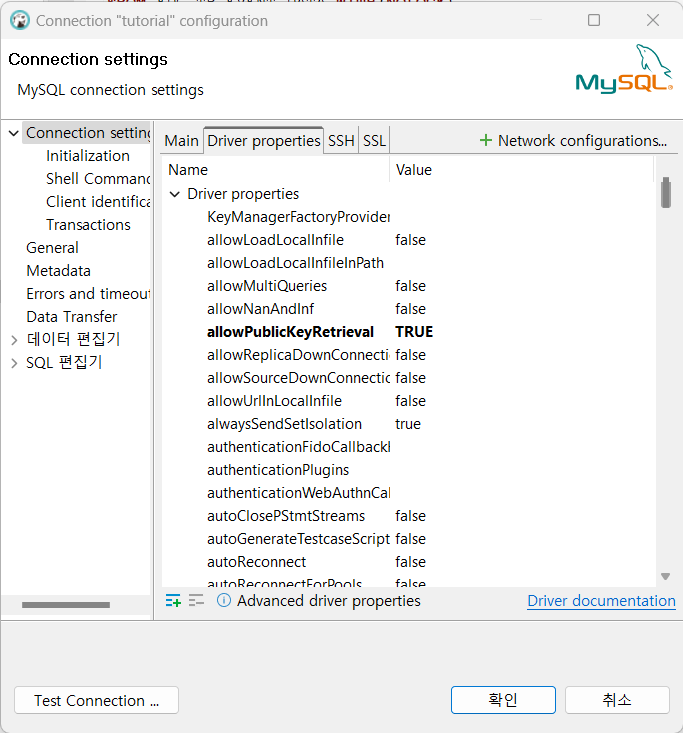
allowPublicKeyRetrival=true
select @@datadir;
docker volume
$ docker volume create my-vol
my-vol
$ docker volume ls
DRIVER VOLUME NAME
local my-vol
$ docker volume inspect my-vol
[
{
"CreatedAt": "2022-05-11T12:02:14Z",
"Driver": "local",
"Labels": {},
"Mountpoint": "/var/lib/docker/volumes/my-vol/_data",
"Name": "my-vol",
"Options": {},
"Scope": "local"
}
]
2022년 5월 11일 수요일
javax.servlet.ServletException: java.lang.IllegalAccessError: class NiceID.Check.CPClient
C:\Program Files\NetBeans-13\netbeans\etc\netbeans.conf
에 설정된 jdkhome 경로와 프로젝트에서 설정한 java 버전이 다를 경우 발생
netbeans_jdkhome="C:\Program Files\ojdkbuild\java-17-openjdk-17.0.2.0.8-1"
경로를 프로젝트에서 설정한 java 와 동일한 경로로 설정.
2022년 5월 9일 월요일
2022년 5월 2일 월요일
java decompile
wget http://www.benf.org/other/cfr/cfr_0_115.jar java -jar cfr_0_115.jar javaclasstodecompiles.class > javaclasstodecompiles.java 2022년 4월 28일 목요일
Image to base64, base64 to image
PIL.UnidentifiedImageError: cannot identify image file
import base64
import io
from io import BytesIO
from PIL import Image

byteImgIO = io.BytesIO()
byteImg = Image.open('./images/img_small.png')
byteImg.save(byteImgIO, "PNG")
byteImgIO.seek(0)
byteImg = byteImgIO.read()
v2 = base64.b64encode(byteImg)
v3 = base64.b64decode(v2)
# i = Image.open(BytesIO(v3))
# i = i.convert('L')
i = BytesIO(v3)
i.seek(0)
i = Image.open(i)
i.save('./images/a.png')
print('finish')
피드 구독하기:
글 (Atom)